

The Morning Queue Shock: Watching Automation Change Your Daily Job
Every time a new chatbot banner shows up on a company website, someone in support starts quietly panicking about their job. You've probably felt that same knot in your stomach, wondering if the skills you spent years building just became worthless overnight. Here's the part nobody tells you upfront: the job isn't disappearing, it's just changing shape, and knowing how it's changing puts you back in control.
Many customer service representatives face this exact fear every single day as companies deploy smart automation tools across their support channels. They see chatbot banners popping up on company websites and assume that human agents are about to be completely phased out.
They do not realize that while AI chatbots excel at handling simple, repetitive questions, they fail completely when faced with complex human emotions and unique edge cases. What looks like a total job replacement is actually a massive shift in what human agents do every day.
Let us look closely at how conversational AI is actually reshaping support roles so you can adapt your skills and build a long-term, future-proof career.
Quick Takeaways Before You Read On
- AI chatbots absorb the repetitive tier-one tickets, not your entire job, they just change what you spend your day doing.
- Companies now value emotional intelligence and complex problem-solving more than fast typing or script memorization.
- Learning to guide AI copilots and manage knowledge bases opens real paths into higher-paying, more stable roles.
- Teams that skip proper AI training often struggle more with the tools than the customers, so training matters as much as the tech itself.
Unpacking the New Dynamic Between AI Systems and Human Agents
To understand where customer service careers are heading, you must look past the extreme media headlines about complete workplace replacement.
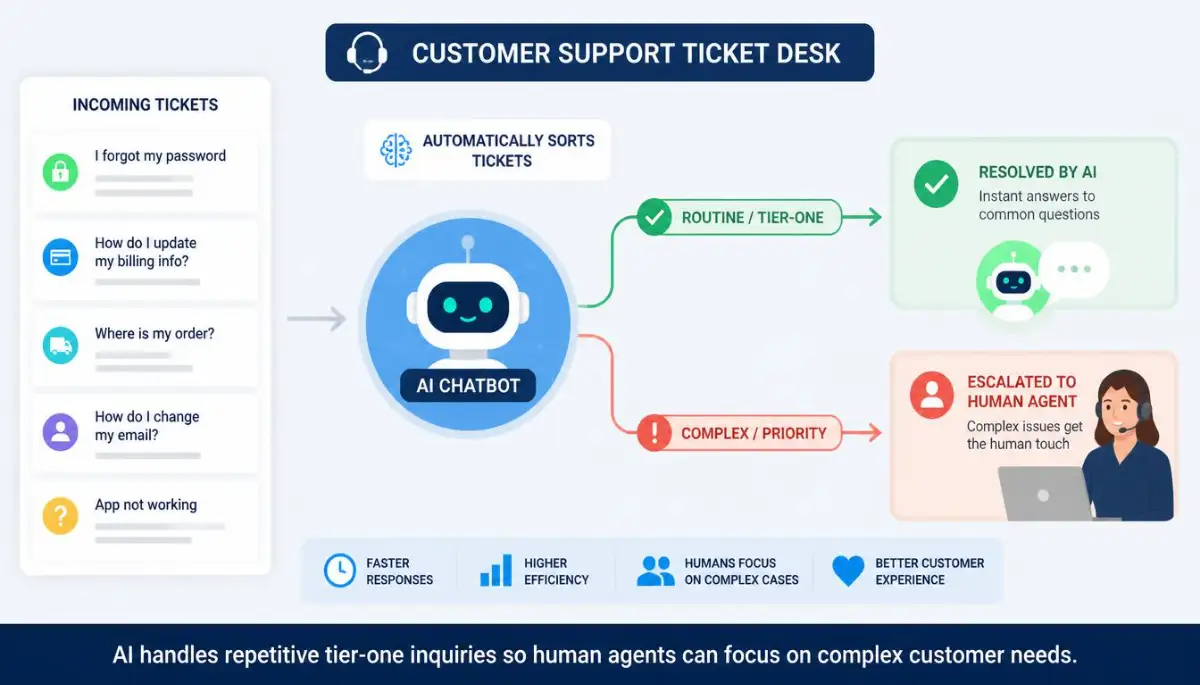
AI chatbots are not human replacements; they are specialized filters designed to handle high-volume, low-complexity workload.
Let us explore the core ways conversational AI is changing the daily routine of support teams around the world.
Tier-One Ticket Automation and the Death of Script Reading
In traditional support setups, human agents spend up to sixty percent of their working hours answering the exact same simple questions.
Tasks like checking order statuses, processing basic returns, and guiding users through password resets require zero creative problem-solving.
Modern natural language processing allows AI chatbots to resolve these tier-one tickets instantly without human involvement.
Here's a quick reality check on the numbers. Support teams that automate their tier-one tickets often see resolution times for simple questions drop from several minutes down to under thirty seconds. That speed isn't replacing you, it's just clearing your queue so you can spend real time on the ticket that actually needs a human brain.
This shift eliminates the boring, repetitive script-reading tasks that cause high agent turnover and mental burnout in call centers.
However, it also means that the tickets that do reach human desks are much more complicated, requiring real critical thinking and empathy.
As a human support representative, you are no longer evaluated on how fast you can copy and paste a canned response.
Instead, your value is measured by your ability to navigate unique customer problems, handle policy exceptions, and turn frustrated users into loyal brand advocates.
This shift elevates the customer service role from a basic entry-level job into a skilled technical and relationship-focused career.
Myth vs. Reality: AI Chatbots in Customer Support
The Rise of Human-in-the-Loop Workflows and AI Copilots
Rather than replacing support teams, modern software companies are building AI tools that work alongside human agents as intelligent copilots.
When a customer submits a complex technical ticket, the AI copilot scans company knowledge bases, past ticket histories, and account records in real-time.
It then drafts a recommended response and suggests relevant troubleshooting steps directly on the support agent's dashboard.
The human agent reviews the draft, adjusts the tone, adds personal empathy, and approves the final message with a single click.

This human-in-the-loop workflow allows reps to resolve technical issues three times faster while maintaining complete control over accuracy and tone.
Pro-Level Tip: Mastering the Art of AI Copilot Prompting
I used to spend ten minutes typing out detailed technical explanations for every complex software ticket that hit my queue. Once our company introduced an internal AI assistant, I learned to feed it raw bullet points of the technical fix and ask it to format the reply in a warm, patient tone. Learning how to guide the AI's drafting process cut my response time by half without losing the personal human connection my customers appreciated.
A friend of mine on a billing team tried this same approach last year. She fed the AI copilot her rough notes on a refund policy exception, then rewrote the tone herself before sending it. Her customer never knew a tool was involved, they just noticed she solved the problem fast and still sounded like a real person.
Real-Time Sentiment Analysis and Emotional De-Escalation
One of the most impressive technical features of modern AI support software is real-time sentiment analysis.
As a customer types a message into a chat window, the AI analyzes word choice, punctuation, and typing speed to measure their frustration level.
If the algorithm detects high anger or urgency, it bypasses standard automated flows and routes the conversation directly to a senior human specialist.
Want to see a step-by-step screen walk-through of how real-time sentiment routing protects customer relationships during high-stress service outages? Watch this quick, expert video guide before reading about agent upskilling below!
Comparing Support Eras: Traditional Representatives versus AI-Augmented Specialists
To see how customer service careers are transforming, let us compare the daily responsibilities of traditional and modern support roles:
Upskilling Support Representatives for the AI Era
As simple ticket handling becomes automated, forward-thinking companies are investing heavily in retraining their support staff for higher-level roles.
Support representatives are transitioning into Knowledge Base Managers, responsible for auditing, updating, and structuring the information that feeds the AI.
If the internal knowledge base contains outdated information, the AI chatbot will generate incorrect answers, frustrating customers and damaging brand trust.
Human agents are also moving into AI Trainer roles, where they review chatbot conversation logs, correct mistakes, and refine response accuracy.
These new career paths offer higher salaries, better job security, and more intellectual satisfaction than traditional call center work.
Embracing these technical skills ensures you remain an indispensable asset to your company as automation continues to expand.
Managing System Hallucinations and Brand Safety Guardrails
Despite rapid advances in artificial intelligence, large language models still suffer from a phenomenon known as hallucination.
An AI chatbot can occasionally invent false company policies, offer unauthorized discounts, or give incorrect technical instructions with complete confidence.
When an unmonitored chatbot gives bad advice, it can lead to legal liability, lost revenue, and severe customer dissatisfaction.
Human oversight remains the ultimate safety guardrail that protects company reputation and ensures brand safety.
Support specialists verify that automated systems operate within strict legal and policy guidelines at all times.
Your human judgment, ethics, and ability to verify facts remain irreplaceable qualities that no software algorithm can copy.
Support Agent Future-Proofing Checklist
To ensure your customer support career thrives alongside AI automation, run through this simple professional checklist:
- Master your company's internal software knowledge base so you understand deep product architecture better than any chatbot.
- Practice writing clear, structured prompts to get the best responses from internal AI drafting assistants and copilots.
- Develop your emotional intelligence and active listening skills to excel at handling high-stress customer escalations.
- Learn the basics of knowledge base management, including how to structure technical documentation for AI retrieval systems.
- Volunteer to review chatbot conversation logs to identify common customer pain points and training gaps.
- Track your personal resolution metrics on complex tickets to demonstrate your value to team leadership.
Running through this career checklist positions you as a modern, tech-savvy support specialist rather than a easily replaced ticket processor.
Taking these proactive steps protects your paycheck, opens new career advancement opportunities, and builds lasting confidence in your professional future.
The future of customer support belongs to human experts who know how to leverage AI tools, so embrace the technology and lead the way.
Building an Unshakeable Career in the Era of Conversational AI
Once you understand how automated ticket routing works, building a lasting career requires specialized skills.
Support agents who thrive in automated environments do not fight against technology; they learn how to manage it.
To future-proof your career, you should adopt a few pro-level habits that highlight your unique human value.
First, focus heavily on developing empathy-first problem-solving techniques.
While automated systems can process text inputs instantly, they cannot feel genuine compassion or understand human frustration.
When a customer contacts your team after an unexpected outage, they do not just want technical instructions.
They want to know that an actual human understands their pain and is taking personal ownership of their issue.
According to industry reports from ICMI research on customer management technology, emotional intelligence is the top skill modern support leaders look for when promoting team members.
Cultivating patient, empathetic communication turns high-stress service calls into long-term customer loyalty.
It makes your presence on the team completely irreplaceable, regardless of how advanced internal automation becomes.
Mastering Knowledge Base Architecture and Prompt Tuning
Another expert secret is learning how to manage the internal documentation that feeds your company's automated tools.
AI chatbots rely on clean, structured knowledge bases to generate accurate answers for customer inquiries.
If the documentation is messy or out of date, the automated assistant will deliver incorrect answers and frustrate users.
Learn how to write clean, modular help articles that both humans and software algorithms can scan easily.
You can also accelerate your daily writing tasks by using AI productivity tools to cut work time when drafting new support guides.
Mastering knowledge management transforms you from a frontline ticket handler into a key operations specialist.
You become the person who controls the quality of the information, ensuring the company's automated tools remain accurate.
Cross-Training in Customer Success and Retention Metrics
To expand your career options, look past simple resolution speeds and learn how your work impacts customer retention.
Modern customer support is no longer viewed as an expense department; it is a primary driver of customer renewal rates.
According to research from MIT Sloan studies on workforce automation, workers who combine technical software skills with customer retention metrics enjoy much higher career stability.
Track how your high-touch customer interactions reduce churn rates and increase account expansion opportunities.
Understanding these business metrics positions you for promotion into higher-paying Customer Success Manager roles.

It connects your daily work directly to company revenue, making your position vital to executive leadership.
Do's and Don'ts for Modern Support Professionals
- Do review AI-generated response drafts carefully to ensure the tone sounds warm, natural, and helpful.
- Do flag incorrect chatbot responses immediately so the technical team can update internal training data.
- Don't copy and paste robotic template replies without adding a personal, human touch for the customer.
- Don't view automated support software as an enemy; treat it as an assistant that handles your busywork.

Subtle Mistakes That Damage Support Teams and Customer Trust
When businesses deploy automated support software too quickly, they often make critical operational mistakes.
Management teams eager to cut costs sometimes forget that customer service is deeply rooted in human relationships.
Understanding these operational traps is essential for support reps, team leads, and business owners alike.
The most dangerous mistake is treating conversational AI as a complete replacement for human judgment.
When companies remove all human contact options from their websites, customers feel trapped in endless, unhelpful loops.
When a customer encounters a complex billing error or service failure, being forced to talk to an unhelpful bot creates intense anger.
According to research published in Harvard Business Review insights on AI support tools, frustrating automated support experiences are a leading cause of sudden customer defection.
Ignoring software maintenance and system hygiene creates massive operational failures, much like 5 hidden dangers of clicking remind me later on system updates where delaying fixes leads to sudden system crashes.
Neglecting Hardware Performance and Network Uptime for Remote Agents
Another major oversight is ignoring the hardware and internet setup used by remote customer support representatives.
Support specialists need fast, reliable hardware to run multiple browser tabs, CRM software, and AI assistant tools simultaneously.
If a remote representative is struggling with a slow computer, their response times will drag, creating long customer wait times.
Remote agents can maintain peak workspace speed by speeding up a slow laptop without buying new through regular system maintenance.
Similarly, resolving connection issues by fixing slow web browsing issues ensures support reps can access customer databases without lag.
Having fast hardware and stable internet allows reps to deliver smooth, impressive service during high-volume shifts.
Failing to Train Support Staff on Advanced AI Copilot Tools
Deploying smart software without proper team training is another common error that wastes company investments.
If support reps do not know how to guide internal AI tools, they will spend more time fighting the software than helping users.
Management must provide structured training on prompt writing, knowledge base editing, and system verification routines.
Proper training builds agent confidence, ensuring the team views new automation tools as helpful additions rather than threats.
It prevents technical confusion on smart workspaces, similar to how troubleshooting lagging smart devices or