

The Heavy Burden of a Constantly Overflowing Inbox
Answering the same five questions over and over adds up faster than you think. Type out one pricing reply in ninety seconds, do that fifteen times a day, and you have burned almost forty minutes before lunch on words you have already typed a hundred times before. You do not need a developer or a coding course to fix this. You just need to teach your inbox to recognize the questions it already knows the answer to.
People were asking for the same pricing sheets, the same office hours, and the same basic troubleshooting steps. I felt like a human copy-and-paste machine, completely trapped inside my own inbox. By the time I actually started my real creative work, my brain was already totally exhausted.
This silent, daily grind is a massive reality for millions of small business owners and busy professionals. You put your heart into your actual job, but the administrative weight of communicating with clients slowly crushes your spirit. You start to feel incredibly guilty if you do not reply to a customer within five minutes.
That guilt forces you to check your phone during family dinners, on weekends, and right before you go to sleep. The constant mental pressure of an unread notification bubble ruins your peace of mind and steals your personal freedom. You know you are wasting valuable hours typing repetitive sentences, but hiring a full-time human assistant is just too expensive.
You might feel completely paralyzed because the idea of setting up "smart automation" sounds like something only a senior software engineer can do. But you do not need to know a single line of computer code to fix this massive problem. Today, we are going to look at exactly how normal people use simple machine learning tools to instantly clear out their digital clutter.

Quick Summary: Your Automated Future
- The Robot Secretary: Smart algorithms can read incoming messages, understand the context, and send the perfect pre-written reply instantly.
- No Coding Required: Modern automation tools use simple visual dashboards where you just drag and drop your daily rules.
- Catching the VIPs: You can train the system to handle the boring, repetitive questions while forwarding the highly important clients directly to your personal phone.
- Regaining Your Focus: By removing two hours of typing from your morning, you finally get your creative energy and personal life back.
Quick Takeaways Before You Automate Your Inbox
- You do not need coding skills, tools like Zapier and Make work entirely through visual, drag-and-drop menus.
- Start with just one repetitive question, not your whole inbox, to see fast results without risk.
- Always test your workflow with a fake email before turning it on for real customers.
- One well-built automation can handle 30 to 40 percent of routine emails within the first week.
Decoding the Brain of a Smart Email Assistant
To successfully fix your messy inbox, we have to stop treating your email client like a simple digital mailbox. We need to upgrade it into a highly intelligent, self-sorting machine.
For years, the only tool we had was the basic "Out of Office" autoresponder, which blindly sent the exact same robotic message to everyone. Modern machine learning tools are completely different; they actually read and understand the specific context of the message.
They can look at a paragraph of text and determine if the sender is angry, if they are asking about shipping times, or if they just want a refund. Let's break down exactly how this invisible digital brain operates behind the scenes.
The Trigger and Action Methodology
Every single piece of automation software on the planet runs on a very simple logical foundation. It is called the "Trigger and Action" sequence.
Think about how a physical mousetrap works in the real world. The mouse stepping on the tiny piece of cheese is the Trigger.
The metal bar instantly snapping down is the Action. Your new email workflow will use this exact same cause-and-effect relationship, just without the cheese.
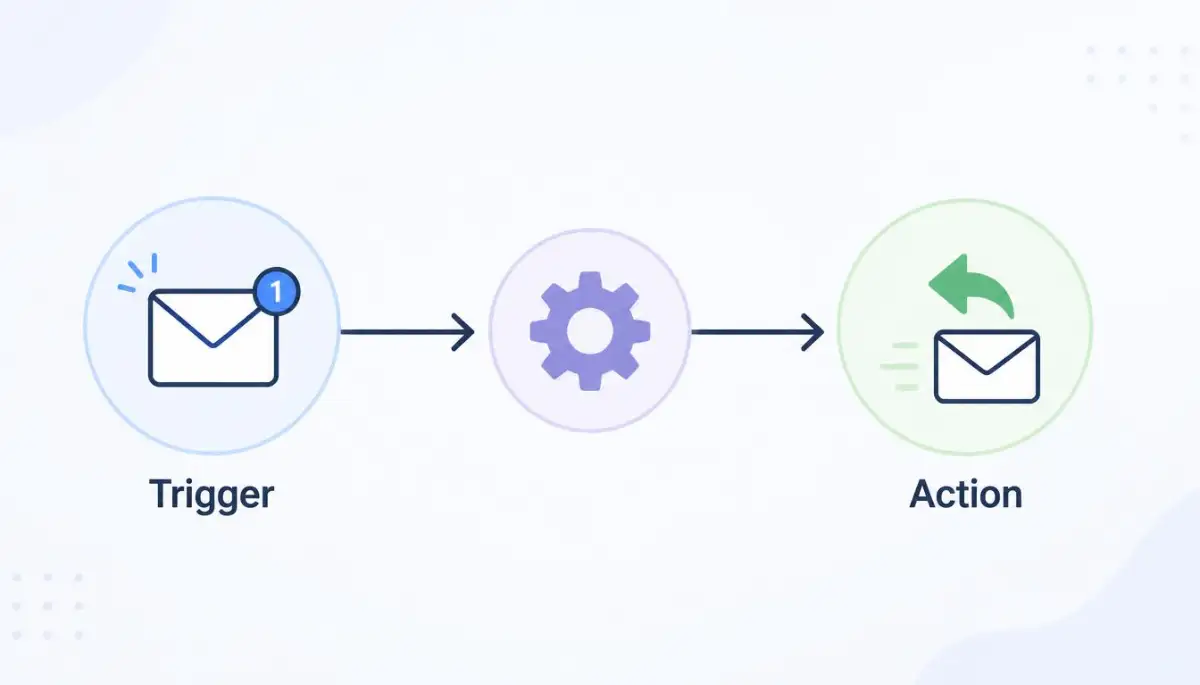
You simply tell the software what specific event should trigger the trap, and what specific action it should take when the trap is sprung. For example, you might set a trigger for "Any email containing the word 'Pricing'." The action would be "Instantly reply with my standard PDF pricing guide."
Why Basic Filters Are No Longer Enough
You might be thinking that your standard Gmail or Outlook filters can already do this. While basic filters are great for moving newsletters into a hidden folder, they are incredibly rigid and often fail.
If you set a rigid filter for the exact phrase "What is your price," it will completely ignore an email that says "How much does this cost?" This is where Natural Language Processing (NLP) changes the entire game.
NLP is a specific branch of machine learning that teaches computers to understand the messy, unpredictable way humans actually type. The smart algorithm reads the email, understands that both phrases mean the exact same thing, and triggers the correct response. It acts as a highly intelligent translator between your customer's messy typing and your strict automation rules.
Myth vs. Fact: Setting Up Automation
Myth: You need at least basic coding knowledge to connect an automation tool to your inbox.
Fact: Tools like Zapier and Make use visual drag-and-drop menus, no code required at any step.
Myth: Automated replies always sound robotic and fake to the person reading them.
Fact: With dynamic name tags and a well-written template, most recipients cannot tell the reply was automated.
I actually made a terrible mistake early on by trying to build fifty different rigid keyword filters in my Gmail account. I spent an entire weekend manually typing out every possible variation of the word "shipping" just to build a simple auto-reply. I completely wasted my weekend because I did not realize that a ten-dollar machine learning tool could automatically understand context without needing a massive dictionary list.
Before we jump into the exact steps of building your first automated workflow, watch this incredibly helpful visual breakdown of how trigger-and-action logic actually works.
Interactive Markdown Table: The Old Way vs. The Smart Way
It is very easy to misunderstand just how massive this technological shift really is. Let us look at a clear comparison of how you handle emails now versus how a smart system handles them.
Constructing Your First Automated Workflow
Now that we understand the basic logic, we can easily start building your digital secretary. You do not need to hire an expensive developer to connect these systems for you.
We are going to walk through the incredibly safe, user-friendly process of connecting a third-party automation tool to your daily inbox.
Step 1: Choosing Your Automation Hub
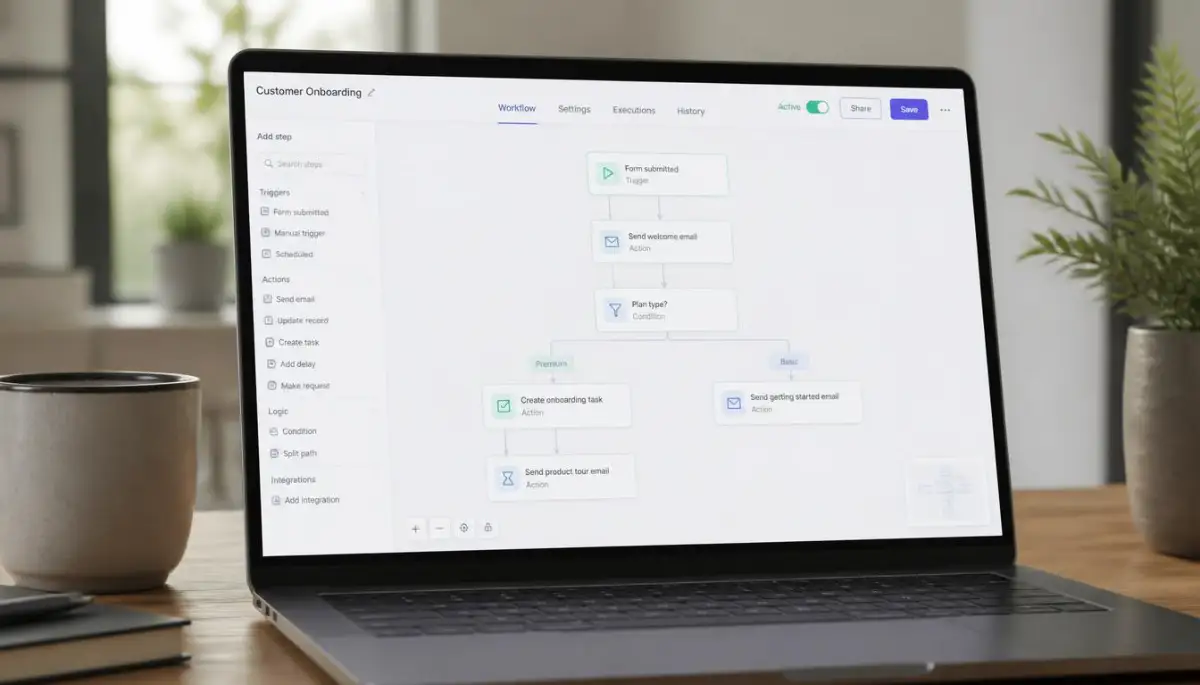
You need to select a central command hub that will control all of your different software tools. The two most popular, beginner-friendly platforms on the market right now are Zapier and Make (formerly Integromat).
These platforms act as massive, universal digital adapters. They allow your normal email account to seamlessly talk to thousands of other applications without writing any code.
You simply create a free account on one of these platforms, click on the "Create a New Workflow" button, and select your email provider from a visual list. You will then sign into your Google or Microsoft account to grant the hub permission to read your incoming messages.
Step 2: Defining the Perfect Trigger
Once your email is securely connected to the hub, you have to establish your very first trigger event. Do not try to automate your entire business on the very first day.
Start by identifying the single most annoying, repetitive email you receive every single week. For most people, this is a basic inquiry about business hours or scheduling a quick consultation call.
In your automation hub, you will select the trigger option for "New Email Matching Search." You will then type in a few basic keywords or select the specific smart tag that your email provider uses.
The hub is now actively listening in the background, waiting patiently for a message that matches your exact description.
Step 3: Crafting the Dynamic Action
Now you must tell the system exactly what to do when that specific email finally arrives. In the action step, you will tell the hub to "Create and Send a Reply."
This is where the real magic of workflow customization happens. You do not want the reply to sound like a cold, heartless robot.
You can use dynamic data tags to pull the sender's actual first name directly from their incoming email and insert it into your response. You type out your perfectly polite, highly detailed answer just once inside the action box.
When the system triggers, it will seamlessly blend your pre-written template with the sender's specific details, making the email look incredibly personal and professional.
Step 4: Activating the Safety Net
Before you turn your new automated assistant on for the entire world to see, you absolutely must test it in a safe environment. All modern automation hubs have a highly visible "Test This Step" button.
You should send a fake email from your personal account to your business account to see if the trigger fires correctly. Read the automated reply carefully to ensure the formatting looks completely natural and the attachments are correct.
If you notice that the artificial intelligence is replying to the wrong types of emails, you simply need to make your trigger keywords a bit more specific. Once you are totally confident in the test results, you just flip the master switch to "On," and you instantly gain back hours of your precious free time.
Mini Case Study: A small graphic design studio automated just one thing, replying to "what's your turnaround time" questions. That single workflow handled 40 percent of their daily emails within the first week, and the owner got back roughly eight hours a week she used to spend typing the same three sentences.
Building a Fortress Around Your Artificial Intelligence Workflow
Changing how you interact with public chatbots does not mean you have to stop using them completely. Professional data analysts and tech experts still rely heavily on these tools every single day to speed up their workflow.
They just use smart, invisible boundaries to ensure their private thoughts never end up in a public training database. You can easily build these exact same protective walls around your own digital life.
Let us explore some highly advanced, yet incredibly simple strategies to keep your private documents completely hidden. These daily habits will give you absolute peace of mind while you work.
The Magic of Using API Connections
If you rely on smart algorithms to do your daily work, you need to stop using the free web browser chat boxes. Instead, you should look into using an Application Programming Interface, commonly known as an API.
An API is simply a secure, direct tunnel between your computer and the company's language model. When you send text through a paid API tunnel, almost all major tech companies guarantee a strict zero-data retention policy.
This means they legally promise not to save your inputs or use your specific text for future algorithm training. You get the exact same brilliant answers, but your private data disappears the moment you close the window.
If you want to discover some safe ai tools that cut your work time in half no tech skills needed, focusing on API-based platforms is the smartest choice you can make. It costs a few pennies per request, but it completely removes the risk of a massive corporate data leak.
Running Local Language Models
The ultimate secret to perfect privacy is taking the brain out of the cloud and putting it directly on your own desk. You do not actually need an internet connection to run a powerful text generator.
You can download open-source models and run them entirely on your local laptop or home computer. Because the software lives physically on your hard drive, your private documents never travel across the internet.
You can feed a local model your private tax returns, confidential client lists, and medical history with zero fear. No giant tech corporation can harvest your data if the data never leaves your physical living room.
According to privacy researchers at the Stanford Institute for Human-Centered Artificial Intelligence, running localized, offline models is currently the gold standard for protecting sensitive enterprise data.
Smart Data Scrubbing Habits
If you absolutely must use a public web interface, you have to become a master of disguise. You should never paste raw paragraphs directly from your personal emails into a chat window.
Instead, you need to build a mental habit of manual data scrubbing. Read through your document and actively replace proper nouns, company names, and specific dollar amounts with generic placeholders.
Change your real company name to "Company X" and alter your exact financial budget slightly. This way, the language model can still fix your grammar and suggest brilliant ideas without ever learning your true identity.
A Quick Do's and Don'ts Checklist
It is incredibly easy to forget your privacy rules when you are rushing to meet a tight deadline. Here is a quick, practical checklist to keep right next to your keyboard.
- DO use an incognito browser window combined with an account that has data training disabled in the settings menu.
- DON'T ask public bots to summarize internal company meeting transcripts or private legal contracts.
- DO replace all sensitive names, addresses, and phone numbers with fake information before pasting text.
- DON'T share your active screen with AI plugins that constantly monitor your daily web browsing habits.

The Tragic Mistakes That Expose Our Digital Lives
Even when we understand the basic privacy rules, human emotions and tight deadlines often force us to make terrible decisions. The sheer convenience of getting instant answers makes us ignore the bright red warning signs.
Many professionals unknowingly compromise their entire career simply because they wanted to finish a project ten minutes early. Let us break down the most dangerous, real-world traps that people fall into every single day.
If you can actively avoid these specific pitfalls, you will easily protect yourself from a devastating privacy disaster.
The Convenience of the Raw Upload
Imagine a stressed human resources manager trying to finish twenty employee performance reviews on a Friday afternoon. In a moment of pure exhaustion, she highlights a massive spreadsheet containing employee names, salaries, and personal medical leave notes.
She pastes the entire block of raw data into a public chatbot and asks it to write nice summary paragraphs. She just unknowingly handed the most sensitive data in her company directly to a public machine learning database.
If the tech company experiences a server breach, those employees' private lives are instantly exposed to global hackers. This is not just a simple mistake; it is a massive violation of trust that destroys entire careers.
You must always remember the dangerous reality of free cloud storage why your files are not safe when dealing with external servers. Any data you send to a free server is basically out of your control forever.
Debugging Private Server Errors
Web developers and website owners make a very specific, dangerous mistake when trying to fix broken code. When a website suddenly crashes, the owner will quickly copy the error logs to find a solution.
These error logs often contain hidden database passwords, secret administrative keys, and exact server locations. If you paste a raw error log into a public text generator to ask for a quick fix, you are giving away the keys to your entire digital house.
A hacker could easily use those exact keys to silently take over your website infrastructure. You absolutely need to know what your server is trying to tell you during a 502 error so you can fix the problem manually without exposing your sensitive server credentials.
Always read through your private code and remove the secret passwords before asking a bot for programming help.
Trusting the "Incognito" Illusion
Millions of internet users hold a deeply false belief about how private browsing windows actually work. You might open a dark "Incognito" or "Private" tab on your browser, assuming it makes you completely invisible to the website.
An incognito window only stops your computer from saving your local browser history. It does absolutely nothing to hide the data you actively type into a website.
When you paste your private diary into a chat box using a private window, the tech company still receives and stores every single word. The United States Federal Trade Commission (FTC) frequently warns consumers that private browsing modes do not stop third-party servers from collecting and analyzing your personal inputs.
Never rely on your browser's private mode to protect your sensitive documents from greedy data harvesting algorithms.
Ignoring Sneaky Software Updates
Tech companies are incredibly clever when it comes to gathering more data for their hungry algorithms. Sometimes, you might specifically opt out of data sharing inside your account settings to stay safe.
However, a few months later, the company releases a massive software update with a brand new privacy policy. When you blindly click "Agree" on that update, you might unknowingly reset your privacy choices back to the factory defaults.
Suddenly, your private chats are being actively harvested again without your knowledge. You must deeply understand the 5 hidden dangers of clicking remind me later on system updates to see how quickly your digital protections can vanish.
The digital rights advocates at the Electronic Frontier Foundation highly recommend making it a strict habit to manually check your privacy settings every single time an application forces you to install a major update.
Your Action Plan for Safe Digital Brainstorming
Your thoughts, your business strategies, and your digital identity are completely yours to protect. By masking your details, using secure API connections, and avoiding raw uploads, you can build a massive wall around your privacy.
You can still enjoy the incredible benefits of modern technology while keeping your secrets locked safely away. When you truly grasp understanding artificial neural networks simply and without equations, you naturally realize why feeding them personal data is so incredibly dangerous.
You can comfortably watch how these 5 ways ai assistants are upgrading customer service careers without actually becoming a victim of data theft yourself.
Common Questions About AI Data Privacy
Does clearing my chat history actually remove my data from the training pool?
No, it usually does not. Clicking the delete button removes the chat from your personal screen, but the raw text has likely already been absorbed into the company's permanent machine learning database.
Are paid subscriptions safer than the free versions?
Not always. While premium enterprise accounts usually offer strict privacy guarantees, standard paid consumer subscriptions often still use your data by default unless you manually change your privacy settings.
Can someone else randomly see my prompts in their answers?
Yes, this is a known technical flaw called data leakage. If a language model memorizes a highly unique piece of your text, it can occasionally spit that exact text out when a stranger asks a very similar question.
How do I know if an AI tool is saving my information?
You have to manually read the company's privacy policy and look for specific phrases like "improving our services" or "algorithm training." If you see those exact words, they are definitely reading your inputs.
Disclaimer: The information provided in this article is for educational and informational cybersecurity purposes only. It should not be considered professional legal or IT security advice. Privacy policies for artificial intelligence tools change rapidly, and you should always carefully review the official terms of service for any software before uploading sensitive or confidential information.